


Background noise remover
LANDR ReHance removes background noise from vocal recordings, get professional-quality results, and let that performance shine through.

How do you remove background noise?
Background noise can be a pretty tricky problem when it comes to vocal recordings. Professional studios provide the kind of isolation and acoustic treatment that are very effective for avoiding it, but this kind of setup isn’t available to everyone, especially home-based and beginner music producers.
So, if you do end up with background noise in a vocal take, how do you get rid of it without compromising the performance?

Background noise remover tools
There are some excellent tools out there that allow music producers to support the vocal performance and the mixdown by removing background noise from vocal takes. These range from standard signal chain essentials to tools that are specifically designed for the task.
What kinds of tools you should use for background noise removal will depend on your approach to production, but there are plenty of options to consider, from the recording process to the mixdown and beyond.
LANDR ReHance, which comes with LANDR Studio, makes it easy to remove background noise and improve vocal recordings without complex mixing or editing.
Effects and techniques for background noise removal
Recording & mic technique
The best way to remove background noise is to prevent it in the first place. It’s important to learn the essentials of recording technique, such as gain staging for a lower noise floor, what microphones are most suitable for what sound sources, how to place microphones at the right angle and distance, and how to isolate your recording environment effectively.
Vocal comping & editing
It’s rare to use a single take in the final mix exactly as it happened in the session. Instead, you should record multiple takes and compile the best parts on the timeline of your DAW. Listen carefully to your recordings so that you can spot background noise, edit it out, or use alternate takes that don’t contain any sounds you don’t want in there.
Noise gates
A noise gate is an effect that blocks out any sound below a certain threshold. This way, the only sound that’s allowed through is the voice or instrument you’ve recorded. There are plenty of noise gate plugins out there, and you might even have one built into your DAW. Don’t rely on them too heavily — it’s better to use them for instances when a small amount of noise needs to be kept out.
EQ
In some cases, you can reduce certain types of background noise with careful and precise use of an EQ, especially if the background material you want to eliminate is in a different part of the audio spectrum than the instrument or vocal. For instance, if you have a low-frequency hum from something outside the room, you can high-pass the recording at a cutoff frequency that leaves the vocal undisturbed.
Noise reduction effects
As you might expect, there are lots of plugins out there that are designed specifically to remove background noise from recordings. These often accomplish the task with noise profiling which takes a sample of the noise in your recording and uses it as a reference point for what elements in the audio need to be removed. Again, this is usually suitable for minor background noise removal tasks.
AI background noise removers
Instead of requiring an exact instance of the noise you want to remove, AI background noise removers have already been trained to understand the difference between unwanted noise and voice or instrument sounds. LANDR ReHance is one of the latest examples, and it makes the background noise removal process incredibly easy compared to other methods.
Removing background noise with LANDR ReHance
.avif)
1. Import your audio files
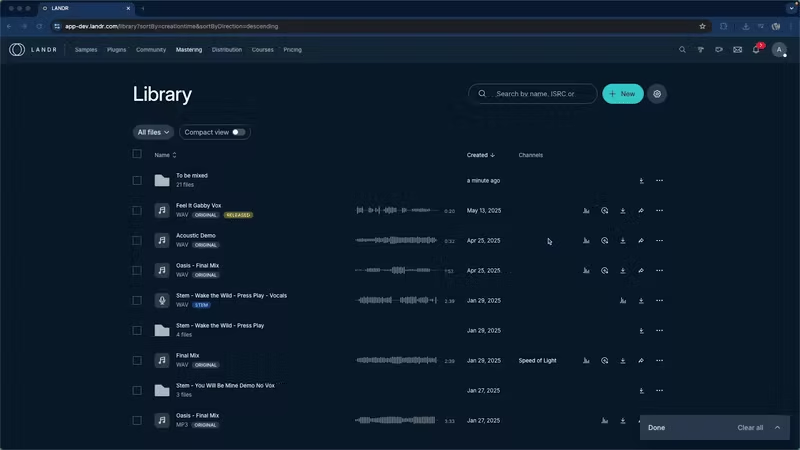
The best thing about LANDR ReHance is that it’s built into your LANDR Library. If you already have your vocal or instrument recordings in your library, step one is already done!
If not, you can either drag and drop your recordings into your library or click “+New” in the upper right corner, select “ReHance”, and choose the recordings you want to remove background noise from.
2. Apply ReHance
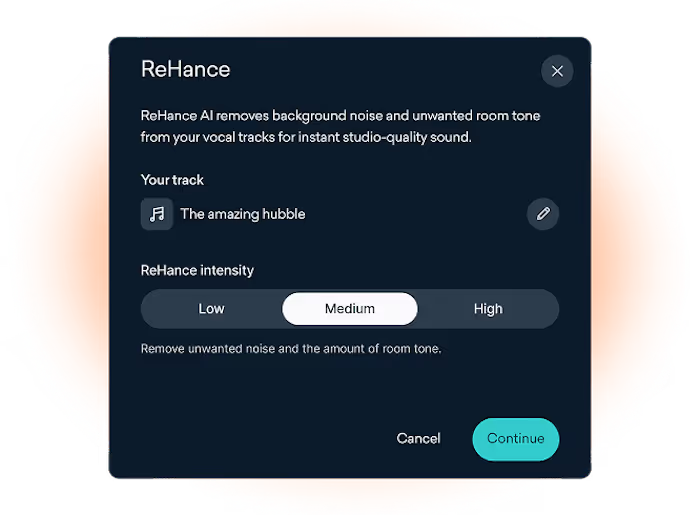
If your recordings are already in your library, you can click the three dots on the right of each file and click “ReHance” to apply the background noise removal.
You can select low, medium, or high intensity based on how strong you want the background noise removal to be.
3. Download your processed recordings
Once ReHance has finished removing the background noise from your recording, a new version will be saved in your library. The new version will have a “ReHance” label next to it to indicate that this is the version that has had background noise removal applied to it.
You can now use or download the recording like any other sound in your LANDR Library!
Mastering Demo
FAQ: Background noise remover
What is a background noise remover?
What is the best background noise remover?
Do background noise removers affect audio quality?
Can I use a background noise remover on video or podcast audio?
Get ReHance and much more
LANDR Studio gets you the world's best intelligent mastering, 40+ plugins, pro-quality samples, worldwide distribution, and more. Everything you need to make and release your best music.


